

Knowledge
Do I Need Accounting Software, or Is a Spreadsheet Enough?
The IRS does not require accounting software. For a sole proprietor filing Schedule C, it permits any record-keeping system that clearly and accurately shows income and expenses, including spreadsheets.
So the question is not whether a spreadsheet is allowed. It is whether your business structure creates a problem that software solves. Five conditions do, and this article calls them switch triggers: if any one of them is true of your business, software earns its cost. If none are, it does not. Run them below; it takes about five minutes, and the answer is a yes or a no rather than a judgment call.
The switch-trigger checklist: Five Yes/No Questions
Run each condition as a yes/no:
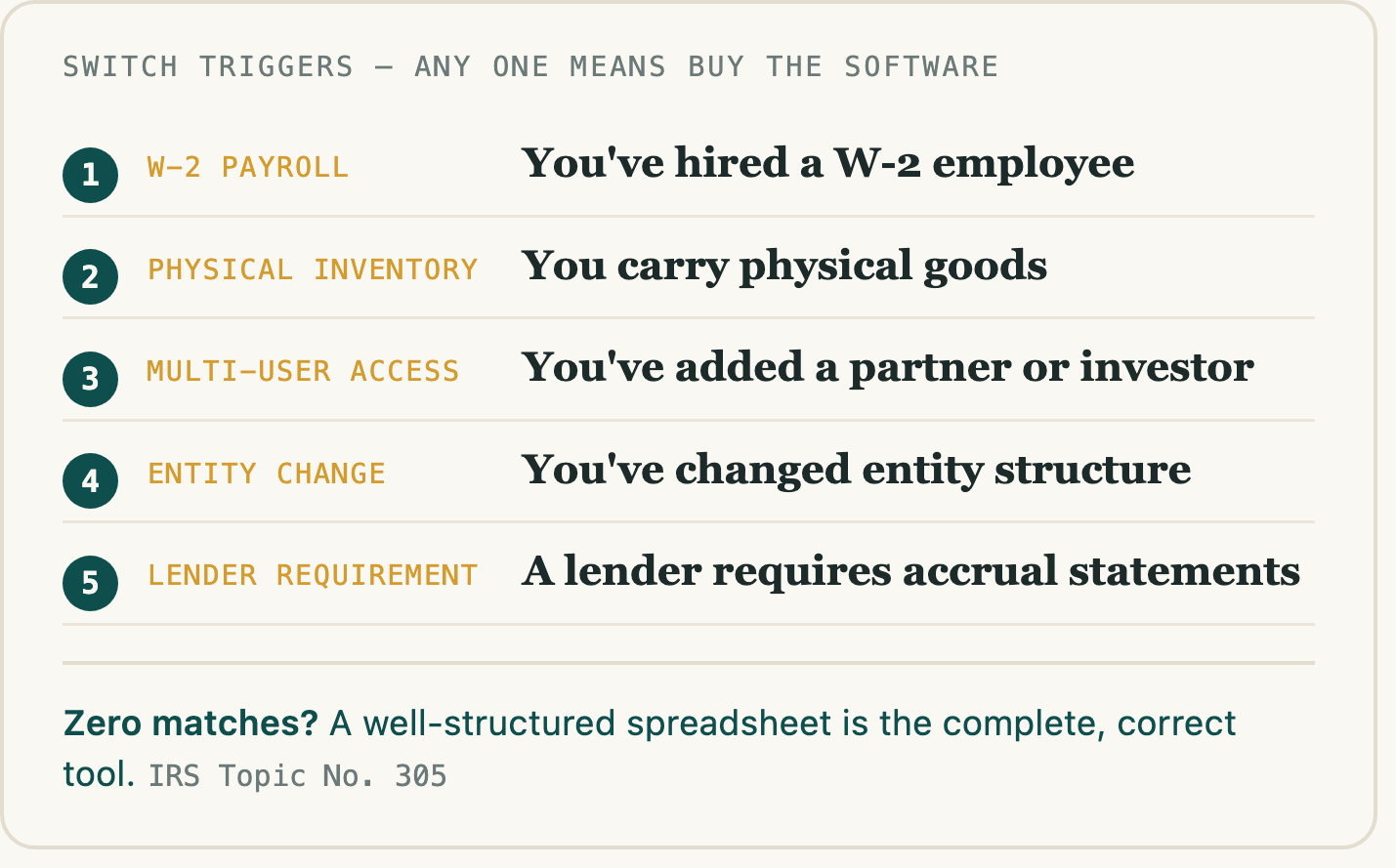
1. W-2 payroll. Have you hired, or do you plan to hire, an employee on a W-2 requiring tax withholding and payroll filings? This trigger is about W-2 employment specifically. Paying an independent contractor who invoices you is a different arrangement and does not by itself create a payroll obligation. If you are unsure how a particular working relationship should be classified, that is a question for a CPA.
2. Physical inventory. Do you carry physical goods and need to track cost of goods sold? Service businesses with no physical product do not trigger this.
3. Multi-user book access. Have you added a partner, co-owner, or outside investor who needs simultaneous access to the books at different permission levels?
4. Entity change. Have you incorporated as an S-corp or C-corp, or formed a multi-member LLC? A single-member LLC is generally taxed as a sole proprietor and does not on its own trigger this condition.
5. Lender accrual requirement. Has a lender required auditable, accrual-basis financial statements as a condition of a business loan or credit line?
Worked example. A freelance designer brings on a subcontractor for overflow work and runs the checklist. No W-2 payroll, because the subcontractor invoices for the work rather than being employed. No physical inventory. No partner or investor. No entity change. No lender requirement. Result: zero triggers matched. The spreadsheet is the correct tool. No upgrade is warranted.
Where to go next. Matched zero triggers? A spreadsheet is the correct tool for your structure. "What a complete spreadsheet covers" below sets out the five things it has to capture. Matched one or more? Skip to the software comparison, which assigns each tool to the specific gap it closes. The sections in between explain why these five conditions are the ones that matter.
What the IRS actually requires: No Software, Any Clear System
The IRS does not mandate any particular bookkeeping system or software for sole proprietors filing Schedule C. It permits any record-keeping system suited to your business, including spreadsheets, that clearly and accurately shows income and expenses.
That is the complete compliance standard. IRS Topic No. 305 (Recordkeeping) states that a taxpayer's records must clearly and accurately reflect gross income and expenses and substantiate both. The IRS does not require double-entry accounting, specific commercial software, or formal ledgers.
Publication 583 (Starting a Business and Keeping Records) provides record-keeping examples such as a business checkbook, daily summaries of cash receipts, and a disbursements journal. These are illustrative, not mandatory requirements. Publication 535 (Business Expenses) was discontinued after the 2022 tax year, and the IRS does not plan to reissue it; for current Schedule C record-keeping guidance, the Schedule C instructions direct filers to Publication 583 and Publication 334 (Tax Guide for Small Business).
So the compliance rationale for accounting software is absent for a sole proprietor with service income. What remains are structural business needs: the five above.
Sources: IRS Topic No. 305 (Recordkeeping); IRS Recordkeeping and "What kind of records should I keep"; IRS Publication 583; IRS Guide to Business Expense Resources. Full links in Sources below.
What those five triggers are about: The Capabilities Behind Them
Each trigger maps to a capability accounting software delivers, and to the structural condition that makes it worth buying.
Bank feeds (automatic transaction import) matter when transaction volume is high enough that manual entry creates reconciliation errors. A consultant working with a small number of clients monthly is unlikely to encounter that volume problem.
Built-in reconciliation matters when multiple accounts, payment processors, or revenue streams make monthly matching genuinely complex. One bank account and one income type does not create that complexity.
Multi-user permissions with role controls matter when a bookkeeper, operations manager, and owner need simultaneous access at different permission levels. A single-owner business with no staff has no use for layered access controls.
Invoice-and-collect payment workflows matter when billing volume warrants automated follow-up and integrated payment collection. A service business sending a small volume of manual invoices monthly is unlikely to face that overhead.
Payroll integration matters when you have W-2 employees requiring tax withholding, filings, and employer contributions. No employees means no payroll.
A sole proprietor with one owner, one bank account, service income, and no employees has no structural driver for any of these five features. Revenue growth does not change that. A $300,000 service business with one owner and one bank account has no inherent payroll, no multi-user requirement, and no reconciliation complexity. Revenue alone does not create these structural needs.
These features are real and worth buying when the structure warrants them. A later section recommends specific tools for readers who qualify.
One thing worth naming, because it drives more switches than any of the five triggers do: the question people usually ask themselves is not "does my structure need this?" but "does my bookkeeping look professional enough?" Those are different questions, and only the first one has a factual answer. Software is often bought to resolve the second.
The skill is the system: Process + Tool
Whichever tool you land on, the thing that actually determines whether your books hold up is the habit behind them: recording transactions on a schedule you keep, categorizing them consistently, and not letting the backlog build. No software installs that habit. Bookkeeping software abandoned in month three produces worse records than a spreadsheet someone opens every Friday.
That points to a sequence. Build the record-keeping skill at the lowest possible friction first, then add complexity only once the business genuinely demands it. Starting in a spreadsheet has the shallower learning curve, and it does not close any doors: the categories you build transfer, and moving to software later is a normal migration, not a rebuild. Nothing about starting simple prevents you from graduating when a trigger fires.
The risk is asymmetric, too. A spreadsheet you purchase once carries a smaller downside than a subscription that renews whether or not you use it. If the process never sticks, the subscription is the more expensive way to learn that. Put the effort into a repeatable weekly routine rather than into tool selection. A spreadsheet plus a process you actually follow will carry you until one of the five triggers tells you, specifically, what to buy next.
What a complete spreadsheet covers: The Five Categories
Here is what the consultant bracing for CPA judgment actually experiences: CPAs receive spreadsheet records regularly. They evaluate whether the records are complete and categorized correctly, not which application produced them.
IRS guidance requires that records clearly and accurately reflect gross income and expenses and substantiate both. A spreadsheet covering these five categories meets that standard for a Schedule C filer, and does not create additional Schedule C error risk compared to accounting software. The error risk is in missing categories, not in the tool.
- Gross income by client or project. Substantiates income at the individual transaction level.
- Expense categories aligned to Schedule C structure. Maps deductions to the line items the IRS expects.
- Date and amount for each transaction. Satisfies the substantiation requirement for every entry.
- Business-purpose note for any potentially mixed-use item. Supports deductibility for items that could be personal or business.
- Running category totals for the period. Lets a CPA confirm completeness without reconstruction.
Publication 583 lists illustrative record-keeping examples, such as daily cash-receipt summaries and disbursement journals, as non-mandatory guides rather than requirements. These five categories meet the IRS standard for a Schedule C filer. They are not an exhaustive statement of all possible IRS requirements.
Your next step: audit whether your current spreadsheet covers all five categories. If any are missing, add them now.
Sources: IRS Topic No. 305 (Recordkeeping); IRS Publication 583. Full links in Sources below.
If you hit a trigger: Which Tool Closes Which Gap
If you matched one or more triggers, the question is not which software has the best reviews. It is which structural gap each tool is built to close.
This is not a product review. All four do broadly the same job, all four change often, and the differences that matter are nuances rather than gaps. Treat the table as orientation: which one is the obvious first look for the trigger you matched, and why. Verify current features and pricing yourself before you commit.
For the record: we make a spreadsheet-based bookkeeping product. We are pointing you at these tools anyway, because the structural answer does not depend on what we sell. If one of the five applies to you, buy the software.
| Your trigger | Obvious first look | What sets it apart |
|---|---|---|
| W-2 payroll | QuickBooks Online | Payroll processing and withholding are built in, and most accountants already work in it, which cuts onboarding friction on their side. Tends to sit at the higher end of this category on price. |
| Multi-user book access | Xero | Role-based permissions and external-collaborator access are its structural strength. Also handles multi-currency if you invoice internationally. |
| Heavy client invoicing, project billing | FreshBooks | Invoicing is the center of the product rather than an add-on. Not the right pick if payroll or multi-entity complexity is the real driver. |
| Cost is the binding constraint | Wave | Has historically offered core bookkeeping and invoicing at no cost, with paid add-ons for payments and payroll. Check what its lowest tier currently includes. |
A note on price. Paid plans in this category generally start around $15 to $40 per month for a single user, with higher tiers running meaningfully more. Vendors discount heavily and rotate promotions, so an introductory rate is often well below the standing rate it reverts to. Treat any figure, including this range, as a starting point and check the vendor's current pricing page before you commit.
Before committing: identify the single structural gap that sent you here, and confirm the tool closes that gap, not adjacent features you may not need for years.
Your next step: Run It, Then Pick the Day
Run the switch trigger checklist against your current business structure. If none of the named triggers apply, a well-structured spreadsheet is the complete and correct tool, not a temporary workaround.
If the checklist returned zero matches:
Open your current spreadsheet and check whether it covers all five categories: gross income by client or project, expense categories aligned to Schedule C structure, date and amount for each transaction, a business-purpose note for any potentially mixed-use item, and running category totals for the period. Add any missing category now.
Then pick the day you will update it, and make it at least weekly. Under roughly ten entries a week, a single weekly pass keeps you current. Above that, every few days is more realistic, because the backlog is what turns a ten-minute task into the one you avoid. Monthly is where most people come unstuck: by the time you sit down, you are reconstructing rather than recording. Put the day on the calendar. That routine is the part that determines whether any of this holds up, and it is the part no tool does for you.
If you'd rather not build the structure from scratch, the FinnStatement tracker is a pre-structured alternative that already covers all five categories. You purchase it once rather than subscribing, which keeps the downside small if the routine turns out not to suit you.
If you matched one or more triggers:
Identify which specific trigger applied, then go to the tool matched to it: QuickBooks Online for payroll, Xero for multi-user book access, FreshBooks for project-based invoicing, Wave for a cost-constrained basic setup. Check that tool's current pricing page before committing.
If the honest answer for you is a spreadsheet, the next step is building one that holds up: the bookkeeping spreadsheet, column by column. If you also have a self-employment tax bill you weren't expecting, here is where that comes from.