

Knowledge
Bookkeeping Spreadsheet for Self-Employed: What to Track, How to Build It, and What Done Looks Like
Where most people actually get stuck
The receipts live in a shoebox. The bank statement arrived three weeks ago and is still in the envelope. The business debit card has been running for almost two years, and somewhere in that time the tracking system that was supposed to happen never got built.
That is not a competence problem. It is a structure problem: nobody ever shows you what a finished bookkeeping spreadsheet looks like, what order to build it in, or what you do with it once it exists. This article shows you all three: the exact columns, the build order, and the weekly and monthly routine that keeps it a defined task instead of an open-ended obligation.
Meet Maya. She runs a freelance design business in its second year: logo work, brand kits, the occasional web project. There is a business debit card, a shoebox on her desk holding paper receipts from a client dinner and a coworking day pass, and a downloads folder with a year of software invoices under names like invoice_final(2).pdf. The bank feed has not been opened since February. She has no system, and the records she does have are split across two places she cannot search.
Maya is not behind because she is bad at money. She is behind because no one has shown her what the finished sheet looks like. She works through every section alongside you.
What the IRS actually requires from a sole proprietor
The Internal Revenue Service (IRS) standard for record-keeping is narrower than most people expect. According to IRS Topic 305 and Publication 583, records must clearly and accurately reflect your gross income and expenses and substantiate both. That is the full requirement. No particular software is named. No format is mandated.
Publication 583's own record-keeping examples, the business checkbook and the disbursements journal, carry an explicit disclaimer from the IRS:
"These sample records should not be viewed as a recommendation of how to keep your records. They are intended only to show how one business keeps its records."
A spreadsheet qualifies as a valid record-keeping system. On electronic records, Pub 583 states:
"All requirements that apply to hard copy books and records also apply to electronic storage systems that maintain tax books and records."
If the spreadsheet records your transactions legibly, and you can reproduce it on request, the format satisfies the standard. The receipts behind each row are what substantiate it, and building that folder is covered below. A spreadsheet is one acceptable format among others, not the only one.
Now the structural fact that changes the size of the job: Schedule C already exists. Part II of the form is a pre-printed list of the expense categories the return expects: advertising, car and truck, legal and professional services, supplies, meals, utilities, and more. The IRS assembled this list. It is on the form you will file.
Building a bookkeeping spreadsheet is not an exercise in learning accounting. It is an exercise in reading a form. The expense categories are not something you have to invent. They are something you have to copy. The category problem is solved before you open a blank tab.
Sources: IRS Topic No. 305; IRS Publication 583; IRS Schedule C and instructions.
What a bookkeeping spreadsheet for the self-employed must include
A bookkeeping spreadsheet for self-employed people must include six things.
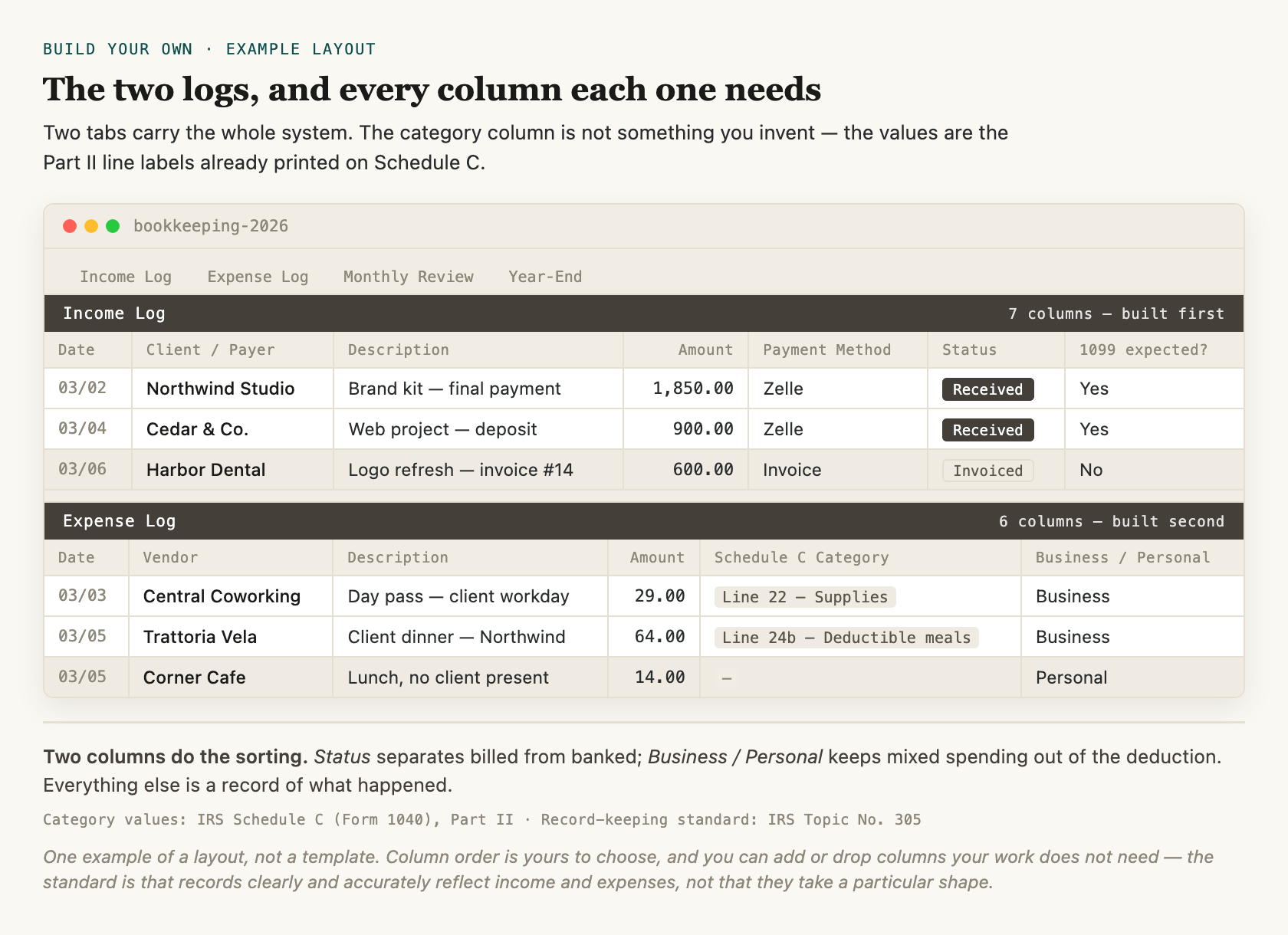
One example of a layout, not a template. Column order is yours to choose, and you can add or drop columns your work does not need. The standard is that records clearly and accurately reflect income and expenses, not that they take a particular shape.
1. Income Log
Columns: date, client or payer, description, amount, payment method, 1099-expected flag. According to IRS Publication 334, all business income must be reported unless excluded by law, regardless of whether a Form 1099 arrives. Pub 334 names cash, checks and credit card charges; bank (ACH) transfers and peer-to-peer payments like Venmo and Zelle fall under the same rule, because business income counts regardless of how it arrives.
Maya's sheet after element 1: One tab, six columns. Her three Zelle payments from clients go in immediately.
2. Expense Log
Columns: date, vendor, description, amount, and a Schedule C category. The category column uses the Part II line labels from Schedule C: advertising (line 8), car and truck expenses (line 9), legal and professional services (line 17), rent or lease of business property (line 20b), supplies (line 22), deductible meals (line 24b), utilities (line 25), and other expenses (line 27b). Home office expenses are entered on line 30, separate from the Part II lines. These are the lines most relevant to service solopreneurs, not an exhaustive list.
Maya's sheet after element 2: Second tab added. Her coworking day pass goes under supplies (line 22). Her client dinner goes under deductible meals (line 24b).
3. Payment-Status Column
Added to the income log: one column marking each row as invoiced or received. This separates amounts that have been billed from amounts that have arrived in the account.
Maya's sheet after element 3: She flags one invoice as invoiced, sent to a client but not yet paid.
4. Business/Personal Flag
Added to the expense log: one column marking each row as business or personal. IRS Publication 583 uses the business checkbook as an illustrative record-keeping example. The flag applies that same logic to a spreadsheet. The IRS does not mandate it; it is simply how you keep mixed spending out of the deduction.
Maya's sheet after element 4: One row flagged personal, a lunch that was not a client meeting.
5. Monthly Review Tab
A dedicated tab where the month closes: income and expense totals are confirmed against the bank statement, outstanding invoices are flagged, and any uncategorized rows are resolved.
6. Year-End Export or CPA Handoff Sheet
The accumulated record organized for a tax preparer: income by month, expenses totaled by Schedule C category, and all flags resolved. No reconstruction required.
If you are weighing a spreadsheet against accounting software for your situation, that comparison is in Do I need accounting software, or is a spreadsheet enough?. The Bookkeeping Tracker is a pre-built version of exactly this six-element structure: Schedule C-mapped, with an IRS citation on each expense category.
Build these six yourself, and you have a complete, correct record. That is the point of this article, and it is genuinely enough. What six hand-built columns will not do is add anything up for you, tell you when a receipt is missing, or show you what the year is tracking toward. Those are the jobs the pre-built version takes over, and they are covered at the end.
Sources: IRS Publication 334; IRS Publication 583; IRS Schedule C and instructions.
How to build the sheet from nothing: the order that works
The build order matters not because the alternative is wrong, but because a sequence removes the paralysis of the blank page.
Step 1: Build the income log, seven columns, all of them typed in
Income comes first because the first question most solopreneurs ask is whether a payment came in, not what they spent.
| # | Column | You type or you pick |
|---|---|---|
| 1 | Date | type |
| 2 | Client / payer | type |
| 3 | Description | type |
| 4 | Amount | type |
| 5 | Payment method | pick from a short list you write once: bank transfer, Zelle, card, check, cash |
| 6 | Status | pick: invoiced or received |
| 7 | 1099 expected? | pick: yes or no |
Column 6 is the one that separates money you have billed from money that has actually arrived. Build it now, in the same pass. Adding it later means revisiting every row you have already entered.
Maya starts here. She has three Zelle payments from client projects that she is not sure she recorded. The income log is the first thing she opens because those payments are the first thing she wants to confirm.
Step 2: Build the expense log, six columns, all of them typed in
Expense questions follow income questions.
| # | Column | You type or you pick |
|---|---|---|
| 1 | Date | type |
| 2 | Vendor | type |
| 3 | Description | type |
| 4 | Amount | type |
| 5 | Schedule C category | pick from the Part II line labels; write the list once and reuse it forever |
| 6 | Business / personal | pick: business or personal |
Column 5 uses Schedule C Part II lines as its values, the same structure the return will expect when you file. Column 6 is what keeps mixed spending out of the deduction, and like the status column, it belongs in the first build rather than a later pass.
A short note on those "pick" columns. Nothing here requires a formula. If your spreadsheet offers data validation (a dropdown), put one on columns 5 and 6 so you are choosing from a list instead of retyping a category eight different ways. If it does not, type them. Consistent spelling is what matters, because that is what lets you total by category later.
Step 3: Create the Monthly Review tab
This is the only tab with any arithmetic on it: it references the income log and the expense log and totals both. Build it last, because it needs data to be meaningful. It activates at month-end.
Beyond the totals on that last tab, no formulas are required. No pivot tables. The IRS does not mandate a particular record-keeping system; the requirement is that records clearly and accurately reflect income and expenses. You do not need accounting knowledge to execute any of these three steps.
The one prerequisite before your first weekly entry pass: both the income log and the expense log must exist.
Sources: IRS Topic No. 305; IRS Schedule C and instructions.
The weekly entry pass: what it covers and how long it takes
The weekly entry pass is a single task: open your bank feed or business debit card statement, log each transaction since your last pass in the income or expense log, assign the Schedule C category to each expense, and mark payment status on any invoices. That is the full scope.
Sunday morning, Maya opens her bank feed. Six transactions since last Sunday: two client payments, a software subscription, a coworking day pass, a supply run, and a client dinner. She logs each one, assigns Schedule C categories already mapped in her expense log, and marks one client payment as received against the invoice she flagged last week. She closes the tab.
Two habits carry this whole system: file the receipt when the money moves, and give the sheet about fifteen minutes once a week. An expense you never recorded is an expense you cannot deduct, and a receipt you cannot find is the same thing as a receipt you never kept, so the fifteen minutes buys you a year-end with nothing to reconstruct.
Fifteen is a rough figure, not a measurement. Six transactions take less; forty take more. Use it as a size, not a target.
What the weekly pass does not include:
- Looking at totals
- Assessing whether a category is running high
- Deciding whether a transaction is deductible
- Comparing income to expenses - did you make money this week or spend too much?
Those belong in the monthly review. Keeping that boundary clear is what makes the weekly pass predictable.
Skipping a week does not just mean more transactions next time. At two or three weeks out, a 15-minute routine becomes a reconstruction project. The cadence is what does the work.
Sources: IRS Schedule C and instructions.
The monthly review: closing the numbers
"Monthly entry" is the failure mode: skipping weekly passes and batching everything at month-end. That session becomes a reconstruction job, not a ten-minute review. Categories get assigned carelessly because you are reconstructing weeks of transactions from memory and a bank PDF. This is the most common mistake.
The monthly review assumes weekly entry is current. When it is, closing a month is a short job. Call it ten minutes, with the same caveat as the weekly figure: it is a size, not a measurement. If weekly entry has not happened, you are not doing a monthly review. You are doing monthly entry.
The monthly review, assuming entry is current:
- Open the Monthly Review tab. (It is a tab you build in step 3 above, and a tab that already exists in the FinnStatement Bookkeeping Tracker.)
- Confirm income and expense totals match what the bank shows.
- Check for any uncategorized or flagged rows.
- Verify all invoices are marked paid, or flag any still outstanding.
- Note any category total that looks unusual.
- Remove any personal-use items discovered during the month.
This is not the time to assess deductibility. That is your CPA's job at filing.
Maya opens her Monthly Review tab on the first Monday of March. Ten minutes: totals match her bank statements, and she catches one invoice from a client that never came in. She flags it. The month is closed.
When the month is confirmed accurate, the sheet is done for the month. That accumulated confirmation is what makes year-end not a project.
Year-end: what you hand a CPA or use to file yourself
When the weekly and monthly cadences have been running, year-end is just the accumulated sheet, exported cleanly.
What the export contains:
- Income totals by month
- Expenses totaled by Schedule C category
- Outstanding invoices flagged
- Business/personal flags resolved
That export is what a certified public accountant (CPA) needs to prepare your return. If your sheet holds these four things, you can give your CPA this export straight from it.
Record retention periods
IRS Topic 305 sets periods of limitations for how long records must be kept. The general period for a Schedule C filer is three years from the filing date; longer periods apply in specific situations, and Topic 305 carries the full schedule.
If the weekly and monthly cadences have been running, year-end is not a project. It is a print.
Sources: IRS Topic No. 305; IRS Publication 583.
When this approach is not the right fit
This approach is designed for one reader: a US sole proprietor or single-member limited liability company (LLC) filing Schedule C, running a service business, with no employees, earning under roughly $250K in annual revenue. The IRS standard it is built around, records that clearly and accurately show income and expenses, applies to Schedule C filers. Outside that filing type, different rules apply.
This approach does not cover:
- S-corp filings. An S-corp is a different entity form with different filing complexity and different tax treatment. The Schedule C framework does not apply.
- Payroll and W-2 employees. Payroll tax obligations require professional handling that this approach does not address.
- Revenue above roughly $250K. This is an approximate complexity threshold, not a legal bright line. At that scale, CPA oversight of the books, not just year-end review, is typically warranted.
- Physical inventory. Inventory tracking requires cost-of-goods-sold accounting that falls outside this framework.
- Multi-owner businesses. Multi-member LLCs and partnerships have filing and allocation requirements this approach does not cover.
For inventory-based businesses or multi-owner structures, see Do I need accounting software, or is a spreadsheet enough?.
The anti-fit reader type
This approach works only for readers who want to understand and control their own books. If you want someone else to handle this for you, this is not that. That is a legitimate preference: it means a bookkeeper or accountant is the right next step, not this article.
If that list did not name you, you are in the right place.
Sources: IRS Topic No. 305; IRS Publication 583.
Where to go from here
Two paths from here, and the first is a real path, not a lesser version of the second.
Build it yourself. The structure is in this article: income log, expense log with Schedule C categories, payment-status column, business/personal flag, Monthly Review tab, year-end export. A blank spreadsheet and the outline above is all you need, and a sheet you built is a sheet you understand. Start here.
Use the FinnStatement Bookkeeping Tracker when you want the sheet to work back. The six elements record what happened. The Tracker is the same structure with the arithmetic and the checking already built in: a Dashboard and Trends tab that total the year as you enter it, a Tax Set-Aside tab, a Mileage Log, a Category Reference carrying an IRS source on each category, a Monthly Review tab that fills its own numbers, a missing-receipts count on the dashboard, an Error Check tab that runs thirteen health checks on the workbook itself, and Ask the Sheet prompts that run on your own free ChatGPT or Claude account. Buy once. Lifetime updates.
The honest difference is not correctness. A hand-built sheet is correct. It is that the hand-built version answers what I spent, and the pre-built one also answers whether I am setting aside enough, which expenses are still missing a receipt, and where the year is heading. If those questions are not pressing yet, build your own and come back when they are.
If you want a smaller starting point before committing to the Tracker, the free Deduction Cheat Sheet gives you the Schedule C category list without the full sheet.
One last thing, and it matters more than the numbers in this article. Everything above is a generalization. Fifteen minutes a week and ten minutes a month describe a small service business with a modest number of transactions; yours may run heavier or lighter, and the right cadence is the one that keeps you current, not the one printed here. The same is true of the columns, the build order, and the folder structure. They are a starting shape, not a standard. Run them for a month, notice where your own work pushes back, and change them. A system you adjusted to fit your business is worth more than a system you copied exactly.
If you're a consultant or coach, there is a trade-specific version of this setup: bookkeeping setup for consultants and coaches, which maps the same build onto retainers, project work, and the categories that actually matter for that trade.
Once the sheet is producing a reliable net-profit figure, that number is the input to everything on the tax side: why you owe self-employment tax on it, and what to actually pay each quarter.
See the Bookkeeping Tracker → · Get the free Deduction Cheat Sheet →
Sources
IRS Topic No. 305, Recordkeeping
IRS Publication 583, Starting a Business and Keeping Records